Contact the following healthcare facilities directly:
MS Center Melsbroek
AZ Turnhout
Sint-Trudo Sint-Truiden
AZ Glorieux Ronse
AZ Jan Portaels Vilvoorde
Rehabilitation Hospital Inkendaal

Health records

Health records

Health records
Health records

Health records

Health records

Operational excellence



Collaboration

Collaboration
Collaboration

Create routes and draw service areas on a map. Patients are automatically assigned to the right area and corresponding route based on their address. Nurses get an overview of the patients, visits and care tasks on their route.
Record nurses’ availability by day and time. Planners can easily see who is available and use this information to assign routes accordingly.
Plan nurses’ schedules with a planning engine that takes availability, qualifications and geographical distribution into account. Automated scheduling assigns nurses to appropriate care tasks and optimises routes between patients. This helps you match staff deployment to care needs while taking travel between visits into account.
Record care directly in the patient record, including during home visits. Document care as it is provided, ensuring the information remains available to you and your colleagues for ongoing follow-up.
Record information about the patient’s health in a structured, coded format in line with international standards. The assessment provides a consistent basis for further care. Structured registration also supports information exchange with other care professionals and systems.
Record nursing problems and areas requiring attention in the patient record, and monitor them during subsequent care visits. Use this information in team meetings to discuss the patient’s condition and coordinate follow-up care with colleagues.
Record observations, discussions and agreements related to palliative care and advance care planning in a dedicated record. You can also update this information on your mobile device during home visits. This helps the care team take the patient’s documented wishes and agreements into account when providing ongoing care.
Record care information for patients with diabetes in a dedicated record. Specific fields, suggestions and guidelines support registration. You can also update the record on your mobile device while with the patient, keeping the information available for ongoing follow-up.
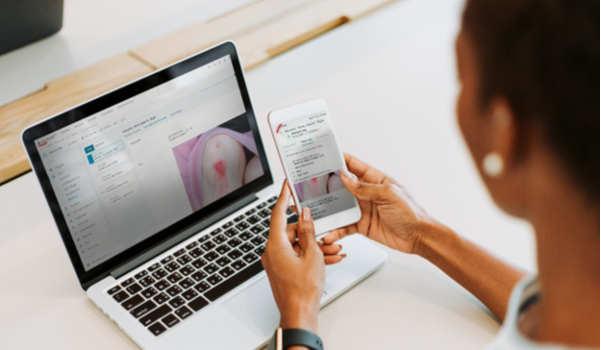
Describe wounds in a structured way and track their progress in the wound care record. During home visits, record your findings in the mobile app and add photos directly to the record. This keeps descriptions and images together for subsequent care visits.
Consult the patient’s medication schedule and record information about medication preparation in the same record. Medication details and preparation records therefore remain available together to the care professionals involved.
Record measurements, pain scores and observations directly in the patient record using the mobile app during home visits. Previous entries remain clearly organised, allowing you to compare values and findings and monitor changes in the patient’s condition over time.
Send and receive secure messages with other care professionals on the Nexuzhealth Mail platform. You can exchange relevant patient information directly with colleagues who use a Nexuzhealth solution.
Exchange secure messages and information with other healthcare professionals via eHealthBox. This also enables communication about patient care with colleagues who do not use a Nexuzhealth solution.
Manage requests and certificates digitally as part of the patient’s administrative follow-up. The documents remain available alongside the relevant patient information, so you can consult them for subsequent administrative tasks.
Find existing patients and manage their administrative details centrally in the patient record. Administrative and care-related information stay together, so you can find the right patient and associated details in the same environment.
Keep the patient’s contacts and their details in the record. When coordination is needed, you can find the relevant contact details alongside the other patient information.
View expected invoicing in real time based on planned and registered care. The forecast shows how expected revenue changes before invoicing is processed. This gives your organisation an up-to-date view of expected revenue at any point in the month.
Monitor expected revenue in a central overview. Your organisation determines which user profiles can access this financial information. This allows you to make it available to the right employees while restricting access for other users.
Before invoicing, check which information is missing or which errors still need to be resolved. For example, the error list highlights missing information for planned care. You can correct the entries before processing the invoices.
Use Annex 1.1 and Annex 1.2 reports to support applications for fixed-rate reimbursement. Nexuzhealth Nurse makes these reports available to help prepare your application administratively.
View previous care and registrations in chronological order. See what happened during earlier visits and how care is progressing. This history helps you prepare for the next visit and maintain continuity of care.
Share relevant information from previous care visits with colleagues taking over care. They can review recent entries and prepare for their next visit using the information already recorded.
Work with colleagues to follow up on patient care using a shared patient record. Access to relevant patient information supports communication and coordination within your team, helping nurses involved in the patient’s care stay informed and coordinate their work.
Use Nexuzhealth Nurse via the web application and mobile app. The cloud application keeps record information continuously updated and available to authorised users. This means nurses and other employees in your organisation always work with the most up-to-date patient information.
View scheduled routes, visits and care tasks in the mobile app. See which patients are on your route and what care tasks you need to carry out during each visit.
For each home visit, access an overview of the patient’s information and planned care. The visit screen brings together everything relevant to that visit, giving you a clear view of the patient’s needs and the care tasks to be carried out.
Access and update patient records on your smartphone or tablet during home visits. Specialist records, including palliative care, diabetes and wound care records, are also available in the mobile app. This allows you to record information directly during visits, reducing the need for administrative work afterwards.
Read and send messages from the mobile app. You can access communication with other care professionals while on your route and consult or share relevant information on the go.
Record care information directly in the mobile app during your route. If the internet connection is temporarily lost, you can continue working. Once the connection is restored, your entries are automatically synchronised with the shared patient record. This keeps all information up to date and available to the care professionals involved.
Record observations, measurements, medication and photos using familiar entry screens. Standard fields, drop-down lists and suggestions support consistent registration in the application. This makes structured data easier to find, share and process further.
Automatically assign nurses to routes based on their availability, qualifications and patients’ care needs. Scheduling takes account of available capacity and the expertise required for specific care tasks. This supports workload allocation across your organisation.
Use the available list-based overviews to monitor operations. Nexuzhealth Nurse can be connected to a data warehouse, allowing application data to be included in further analyses within your organisation.
Exchange administrative patient data digitally through the MyCareNet integration. This connection supports administrative follow-up from within Nexuzhealth Nurse.
Check a patient’s insurability through Memberdata. The information is retrieved live, giving you up-to-date details for administrative follow-up.
Send and receive secure messages and documents through the integrated eHealthBox. The connection brings communication with external care professionals into your digital workflow in Nexuzhealth Nurse.
Consult available health information through the Vitalink connection and make relevant information available via the platform. This exchange supports coordination between care professionals involved in the same patient’s care.
Exchange electronic prescription information digitally through the Recip-e integration, supporting the exchange of prescription details as part of patient care.
Give patients access to their health information through Mynexuzhealth. Relevant information recorded by home nurses in Nexuzhealth Nurse can also be shared with patients through their patient record, helping them stay informed about their care.
Access relevant patient information from connected Nexuzhealth healthcare institutions and primary care records in Nexuzhealth Doctor and Nurse. Through Nexuzhealth Consult, healthcare professionals with a RIZIV number and a valid therapeutic relationship can view available information, including medical images, prescriptions and reports, within their access rights. You can also book appointments for patients directly at connected healthcare institutions.
Work with GPs who use Nexuzhealth Doctor from the same central electronic health record. Relevant information, including medication, health problems, observations, documents, measurements and pain scores, is available to the healthcare professionals involved. This reduces the need to exchange the same information separately each time.
Would you like to plan, record care, bill and collaborate more efficiently? Our experts will be happy to show you how Nexuzhealth Nurse can support your practice or organisation.


Explore inspiring stories, expert insights, and get to know Nexuzhealth better.

MS Center Melsbroek
AZ Turnhout
Sint-Trudo Sint-Truiden
AZ Glorieux Ronse
AZ Jan Portaels Vilvoorde
Rehabilitation Hospital Inkendaal